
Need a website that your team can actually manage after launch?
Creatricx builds WordPress websites, custom websites, ecommerce stores and web applications around the job the platform needs to do, rather than forcing every business into one CMS.
Table of Contents
The Short Answer: Yes, but Professionals Use WordPress at Different Depths
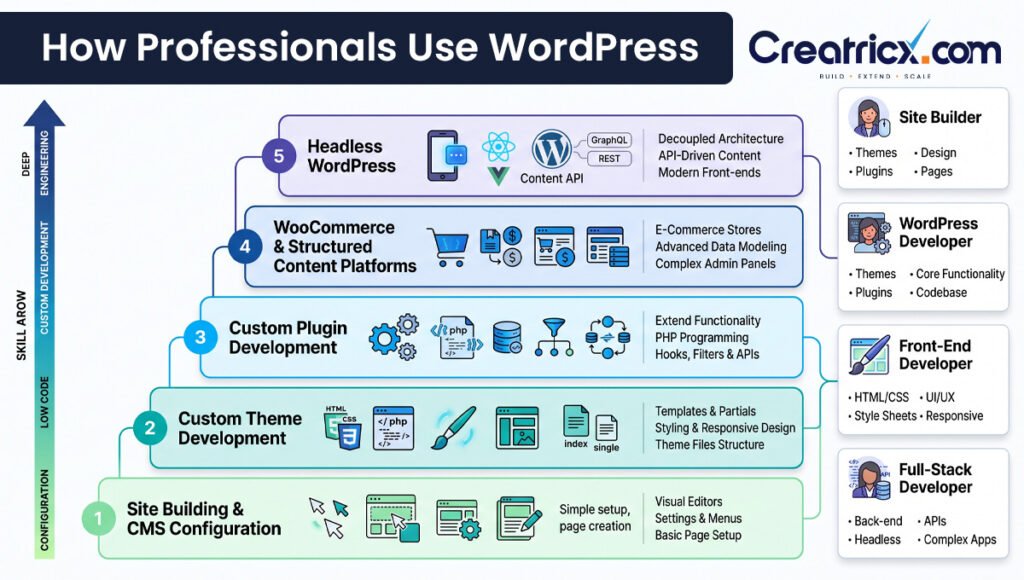
A business owner editing a page in WordPress, a designer arranging blocks, and an engineer building a custom plugin can all truthfully say they are using WordPress. Their work is not the same.
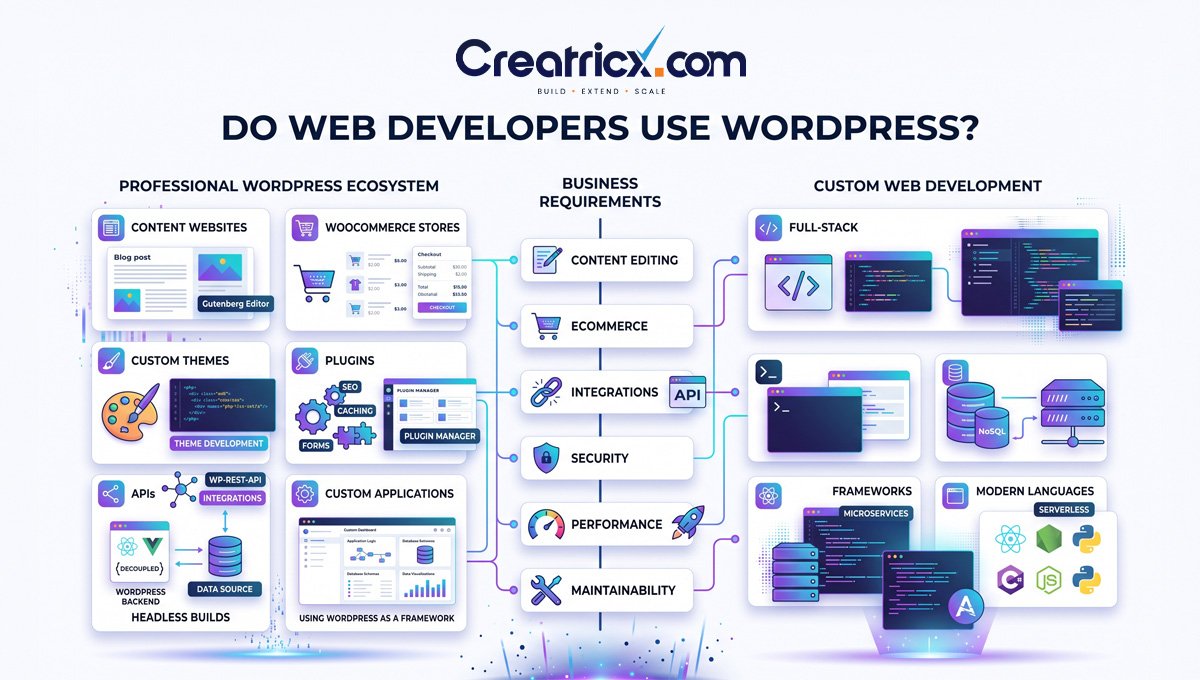
1. Site building and CMS configuration
A developer may use the block editor, Site Editor, patterns, trusted plugins and platform configuration to build a manageable business site quickly. This is still professional work when the architecture, performance, accessibility, SEO and handover are handled properly.
2. Custom theme development
WordPress’s Theme Handbook supports both block themes and classic themes. Modern block themes rely heavily on blocks, templates and theme configuration; classic themes commonly use PHP, JavaScript and CSS. Developers choose the approach based on the project and existing ecosystem.
3. Custom plugin development
When off-the-shelf plugins do not fit the business requirement, developers can create custom plugins using WordPress APIs, hooks, settings, custom content types and permissions. This is where WordPress stops looking like a website builder and starts behaving like an application platform.
4. WooCommerce and structured content platforms
Developers use WordPress for ecommerce, memberships, directories, content portals and operational websites when the CMS and plugin ecosystem provide a useful foundation but the implementation still needs custom design, integrations and code.
5. Headless WordPress
WordPress can manage content while a separate frontend built with another technology renders the experience. The REST API is specifically designed to let applications interact with WordPress data. This can be powerful, but it also creates two systems to build, deploy and maintain.
Is Building With WordPress Really Web Development?
Yes, when the work involves building, adapting or maintaining the web experience. Web development is not defined by how many lines of code somebody suffers through before lunch.
A professional WordPress project can involve HTML, CSS, JavaScript, PHP, APIs, database queries, server configuration, accessibility, performance, security and deployment. WordPress’s own developer documentation assumes those skills for advanced theme and plugin development.
At the same time, not every person who edits WordPress is a web developer. Using a CMS and developing for a CMS are different activities.
WordPress Site Builder vs WordPress Developer vs Web Developer
| Role | Typical work | Best fit | Important distinction |
|---|---|---|---|
| Site builder / implementer | Configures WordPress, themes, blocks, page builders and plugins | Business sites, landing pages, content setup | May not write substantial custom code |
| WordPress developer | Builds themes/plugins, integrations, custom content and performance/security improvements | Custom CMS sites, WooCommerce, complex WordPress platforms | Specializes in WordPress architecture and APIs |
| Front-end developer | Builds browser interfaces with HTML/CSS/JavaScript and frameworks | Interactive interfaces, design systems, apps | May consume WordPress as a CMS or not use it at all |
| Back-end / full-stack developer | Builds application logic, APIs, databases and system integrations | Custom web apps, portals, complex platforms | May use WordPress only when it fits the architecture |
Why Professional Developers Choose WordPress
When Creatricx Would Recommend WordPress
- A service business needs a professional website that marketers can update regularly.
- SEO, content publishing and landing-page creation are important to growth.
- The site needs custom layouts, reusable blocks, forms, CRM integrations or moderate business-specific functionality.
- WooCommerce fits the ecommerce model and content remains an important part of acquisition.
- The business wants ownership of the CMS and a broad ecosystem of developers and hosting options.
- The project benefits more from a mature CMS than from a bespoke application backend.
This matches Creatricx’s current website-development positioning: WordPress is offered for business websites and manageable CMS builds, while custom development is recommended when the platform needs unique or application-heavy functionality.
When We Would Not Choose WordPress
- The product is primarily a software application, not a content website.
- The interface behaves like a complex SaaS product, internal system or high-interactivity dashboard.
- The domain model and application logic are highly custom and WordPress would mainly act as an awkward wrapper around custom code.
- The project needs a technology stack already standardized across an engineering organization.
- A specialized platform such as Shopify solves the ecommerce operating model more cleanly.
- A headless WordPress architecture would add a second system without a strong content-management reason.
WordPress vs Custom Development: A Business Decision Tree
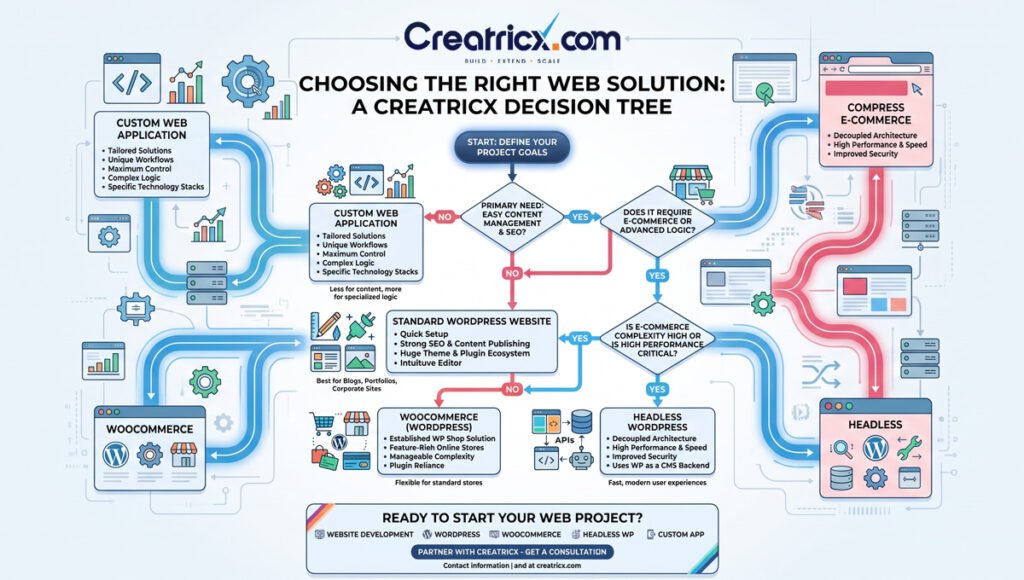
The Professional WordPress Workflow Is the Part Most Articles Skip
The strongest difference between a hobby WordPress build and a professional one is rarely the homepage design. It is what happens before launch, during updates and six months after the original developer has forgotten the project.
Original Creatricx professional WordPress workflow.
Discover: define business goals, users, content types, publishing ownership, integrations and conversion paths.
Architect: decide block theme vs classic/custom theme, plugin responsibilities, hosting, caching and data boundaries.
Build away from production: use local or staging environments for meaningful code and configuration changes.
Use version control for custom code and document environment-specific configuration.
Test: responsive layouts, forms, accessibility, browsers, search behavior, analytics and critical integrations.
Harden: apply sensible permissions, validate input, escape output, keep dependencies current and maintain backups.
Launch: verify redirects, analytics, crawlability, performance and production credentials.
Handover: document custom behavior, critical plugins, account ownership, backup process and what the client can safely edit.
Professional WordPress Developers Do Not Edit Core
WordPress’s own Plugin Handbook describes a simple cardinal rule: custom functionality should not be added by modifying WordPress core files because updates overwrite those changes.
Professional developers extend WordPress through plugins, themes, hooks and APIs. That separation makes updates, debugging and handover more predictable.
Do Professional Developers Use Page Builders?
Sometimes. A page builder is a tool, not a professional identity test. The decision depends on who needs to edit the site, design complexity, performance budget, plugin compatibility and the client’s maintenance skills.
For some marketing websites, a controlled builder can reduce future content costs. For other projects, custom blocks or a custom theme produce a cleaner and more predictable system. The mistake is not using a builder; the mistake is letting every page invent its own design system.
- Use reusable components and global styles rather than one-off page styling.
- Limit editor permissions where a client should change content but not structure.
- Do not install multiple builders or overlapping design frameworks.
- Measure front-end performance instead of assuming the builder is either automatically slow or automatically fine.
- Prefer maintainable content structures that survive staff changes and redesigns.
WordPress Performance Is a Development Problem, Not a Cache-Plugin Ritual
WordPress’s performance documentation lists hosting, configuration, theme weight, plugin behavior, image size, caching and database/server setup as meaningful factors. That is a useful correction to the popular idea that every performance problem is solved by installing one more plugin.
- Choose hosting that matches traffic and dynamic workload.
- Keep themes and plugins purposeful rather than collecting features for hypothetical futures.
- Measure queries, page weight, JavaScript, images and third-party scripts.
- Use appropriate page, object, browser and server caching where the site benefits.
- Optimize images and delivery rather than uploading raw marketing assets directly from a design folder.
- Test performance after plugin changes and major content-template updates.
WordPress Security Is Also an Implementation Responsibility
The current WordPress security guidance tells developers not to trust incoming data, to validate and sanitize input, escape output, use WordPress APIs where possible and keep code current. The risk surface often sits in themes, plugins, integrations and account access rather than in a vague concept called 'WordPress security'.
- Use least-privilege accounts and avoid sharing one administrator login across everyone who has ever met the website.
- Keep WordPress core, plugins and themes maintained.
- Use reputable dependencies and remove abandoned or unnecessary plugins.
- Protect custom forms and actions with appropriate capability checks and security mechanisms.
- Back up before meaningful changes and test important updates where practical.
- Control domain, hosting, DNS, analytics, Search Console and critical license accounts under the business rather than a departing supplier.
Original Creatricx WordPress risk map.
Headless WordPress: Professional Tool or Unnecessary Complexity?
Headless WordPress means WordPress remains the content-management system while another frontend consumes its content through APIs. WordPress’s REST API is explicitly designed to allow separate applications to retrieve and update site data.
This can make sense when a company wants a custom application frontend, multiple channels consuming the same content, or a frontend technology standardized across a product team.
It can also be unnecessary. A business brochure site does not become more professional because it now requires two repositories, two deployment pipelines and a developer to preview a typo.
What We Look for When Taking Over an Existing WordPress Site
This takeover checklist is where platform experience becomes visible. The homepage can look perfectly respectable while the site underneath is one plugin update away from a very educational afternoon.
How Creatricx Approaches WordPress Development
Creatricx treats WordPress as one possible architecture, not the default answer to every website request. Our current website-development services include WordPress/CMS development, custom websites, ecommerce, landing pages, web applications, integrations, maintenance and dedicated developers.
For WordPress projects, the aim is a website the business can operate after launch: manageable content, reusable components, sensible plugin boundaries, performance, technical SEO foundations, secure access and ongoing maintenance.
For projects where custom application behavior dominates, Creatricx can move into a custom web stack rather than continuously bending WordPress until the CMS becomes the least understandable part of the system.
- Business website: WordPress is often a strong fit.
- Content-heavy SEO platform: WordPress is usually worth evaluating early.
- WooCommerce store: evaluate product/catalogue complexity, checkout, integrations and performance before committing.
- Custom portal or dashboard: decide whether WordPress genuinely simplifies content/admin needs or merely adds another layer.
- Long-term mixed roadmap: use dedicated WordPress / web developers when ongoing development capacity matters more than one launch project.
WordPress, WooCommerce or custom development?
Creatricx can review your content, integrations, ecommerce requirements, editing needs and application logic, then recommend the platform around the business rather than around our favorite tool.
Frequently Asked Questions
Do professional web developers use WordPress?
Yes. Professional developers use WordPress for custom business websites, themes, plugins, WooCommerce, integrations, content platforms and headless CMS implementations. WordPress is a development platform as well as an editor.
Is WordPress only for beginners?
No. WordPress is accessible to beginners, but the platform also exposes theme, plugin and REST APIs used by professional developers. The complexity depends on what the site needs to do.
Is WordPress considered web development?
Yes, when someone is building or extending websites with WordPress. Custom WordPress work can involve PHP, HTML, CSS, JavaScript, APIs, databases, security, hosting and deployment.
Do web developers code when using WordPress?
Often. Developers may write custom themes, plugins, block code, CSS, JavaScript, PHP and API integrations. Some projects need very little custom code; others use WordPress as only one layer of a larger technical system.
Do professional developers use WordPress themes?
Yes, but the approach varies. Developers may build a custom block theme, create a classic custom theme, extend a trusted theme or use a controlled starter system. The important issue is maintainability, not whether the word 'theme' appears in the project.
Do professional web developers use Elementor or page builders?
Some do. Page builders can be appropriate for marketing-led sites where non-developers need flexible editing. Other projects are better served by custom blocks or themes. Professional use depends on performance, governance and maintenance requirements.
When should a business use WordPress?
WordPress is a strong candidate when content publishing, SEO, editable pages, business websites, structured content or WooCommerce are central requirements and the CMS reduces custom work.
When should a business not use WordPress?
A custom stack may be better when the product is primarily a complex web application, the business already standardizes another architecture, or WordPress would provide little value beyond a small admin screen.
What is headless WordPress?
Headless WordPress uses WordPress as the content backend while a separate frontend application displays the experience. Content can be exposed through the REST API. It adds flexibility but also adds development and deployment complexity.
Is WordPress secure for professional websites?
It can be when core, themes, plugins, hosting, accounts and custom code are maintained properly. WordPress's own developer guidance emphasizes validation, sanitization, escaping, APIs and keeping code current.
Can WordPress websites be fast?
Yes. Performance depends on hosting, theme and plugin behavior, caching, database/server configuration, images and third-party scripts. A slow WordPress site usually needs diagnosis rather than a philosophical argument about CMS platforms.
Does Creatricx build WordPress websites?
Yes. Creatricx provides WordPress/CMS development, WooCommerce, custom website development, integrations, maintenance and dedicated WordPress developer support. The platform is selected according to the project's business and technical requirements.
Final Takeaway
Professional web developers use WordPress because it solves a useful class of problems: content management, publishing, structured pages, ecommerce and extensible business websites. They do not use it because writing custom code has somehow gone out of fashion.
The professional skill is knowing where WordPress should stop. Use it when the CMS, editorial workflow and ecosystem save meaningful work. Extend it through themes, plugins and APIs when the business needs custom behavior. Choose a different stack when application logic is the product and WordPress would mostly become an extra dependency.
At Creatricx, that is the platform decision we would rather make with a client: not 'Can WordPress build this?' but 'Is WordPress the cleanest system for owning, operating and improving this website after launch?'
Build the website around how the business will use it
Creatricx can design and develop WordPress sites, WooCommerce stores, custom websites and web applications, then provide ongoing development and maintenance as the platform grows.