
Cloud services are online technology resources, storage, software, servers, databases, backups, and security tools, that businesses access through the internet instead of managing everything on local computers or physical servers. Common examples include Google Drive, Microsoft 365, Dropbox, Shopify, AWS, Microsoft Azure, and Google Cloud.
Need Help Moving To The Cloud?
Cloud services can make a business faster, more flexible, and easier to manage, but only if they're planned properly. Moving files, apps, hosting, backups, or business systems into the cloud without a clear setup can create security gaps, messy costs, and technical confusion. Naturally, humans found a way to make "less hardware" still complicated.
Creatricx helps businesses plan, migrate, manage, and secure cloud systems based on real needs. That can include cloud hosting, backup setup, monitoring, infrastructure support, cloud migration, and long-term technical maintenance.
The goal isn't just to "use the cloud." The goal is to build a cloud setup that supports your website, apps, data, teams, customers, and future growth without turning your IT environment into a monthly billing mystery.
What Are Cloud Services?
Cloud services are technology services delivered through the internet. Instead of buying, installing, and maintaining physical servers, storage devices, software, or security systems inside your office, you use resources managed by a cloud provider.
In simple terms, the cloud lets a business access technology without owning all the hardware behind it.
For example, when you use Google Drive to store files, Microsoft 365 to work on documents, Shopify to run an online store, or AWS to host a website, you're using cloud services. The servers and systems still exist, obviously. They didn't float into the sky wearing angel wings. They're just managed in professional data centres and accessed online.
"Cloud" doesn't mean the data isn't stored anywhere physical. It simply means the hardware is owned and maintained by someone else, in a data centre, rather than sitting in your own office.
Cloud services can include:
- File storage
- Website hosting
- Business software
- Databases
- Backups
- Cybersecurity tools
- App development platforms
- Communication tools
- Analytics and reporting systems
The main idea is flexibility. A business can start small, add more storage, users, apps, or computing power when needed, and avoid managing everything manually. That's why cloud services are used by small businesses, e-commerce stores, agencies, software companies, remote teams, and large enterprises.
Simple Examples Of Cloud Services
Cloud services are easier to understand when you look at tools businesses already use every day. Most companies are already using the cloud in some form, even if nobody in the office is dramatically announcing "we're operating in the cloud now," which is probably for the best.
Here are common examples:
- Google Drive for storing and sharing files online
- Microsoft 365 for email, documents, spreadsheets, and team collaboration
- Dropbox for file storage, sharing, and syncing across devices
- Shopify for building and managing an online store
- Salesforce or HubSpot for managing customers, leads, and sales pipelines
- AWS, Microsoft Azure, or Google Cloud for hosting websites, apps, databases, and business systems
- Zoom or Slack for online communication and team collaboration
- Cloud backup tools for protecting business files and recovering data after accidental deletion, damage, or system failure
- Cloud security tools for monitoring threats, managing access, and protecting company data
These examples show that cloud services aren't just one thing. Cloud can mean software, storage, hosting, backups, security, or development platforms. The right service depends on what the business needs to do, storing files, running a website, managing customers, building an app, or keeping data safe.
How Do Cloud Services Work?
Cloud services let businesses tap into computing resources via the web rather than running all the hardware, software, and systems themselves. The data centres, servers, storage, networking, and core infrastructure are owned and managed by the cloud provider. The business is simply using those services online.
Here's the basic process:
- A cloud provider runs large data centres with powerful servers and storage systems
- A business chooses the cloud service it needs, such as software, hosting, storage, backup, or security
- Users access that service through a browser, app, dashboard, or API
- The business pays through a subscription, monthly plan, or usage-based pricing
- Resources can be increased or reduced as the business needs change
For example, if an online store gets more visitors during a sale, cloud hosting can provide more capacity without the business buying a new physical server. If a team needs more file storage, it can upgrade the cloud plan instead of installing new hardware in the office like it's 2006 and everyone enjoys suffering.
Cloud services do reduce a lot of manual IT work, but that doesn't mean cloud is automatically effortless. Updates, server health, uptime, and infrastructure security still need managing properly, by the provider, your team, or a cloud support partner.
Main Types Of Cloud Services
Cloud services come in different types depending on how much control a business wants and how much technical work it wants to manage. Some services are ready to use, while others give developers and IT teams more control over servers, platforms, and infrastructure. Because naturally, one type of cloud wasn't enough. We needed categories too.
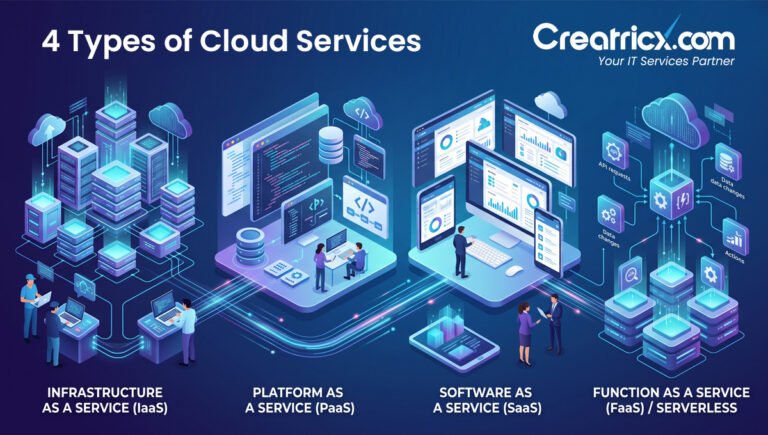
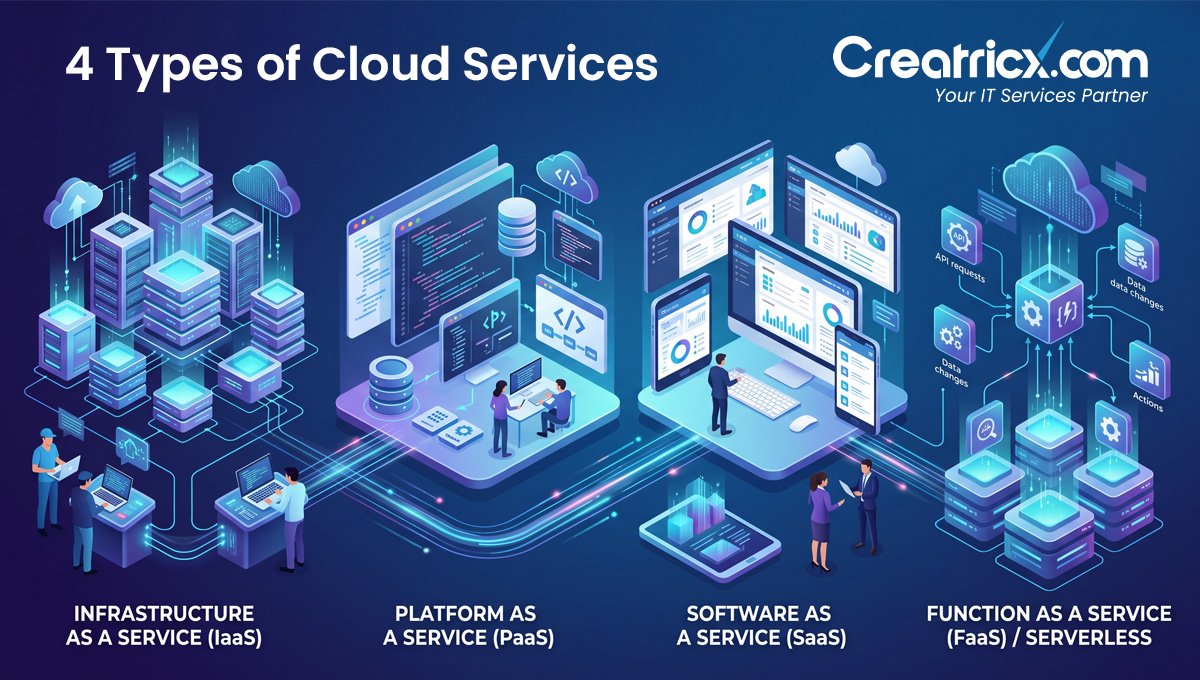
For most businesses, SaaS is the easiest cloud service to understand, since it's simply software used through the internet. IaaS and PaaS are more technical and are often used for websites, apps, databases, and custom systems. Cloud storage and backup are common across almost every type of business, because losing files is still, somehow, a popular workplace tradition.
Cloud Service Types Compared
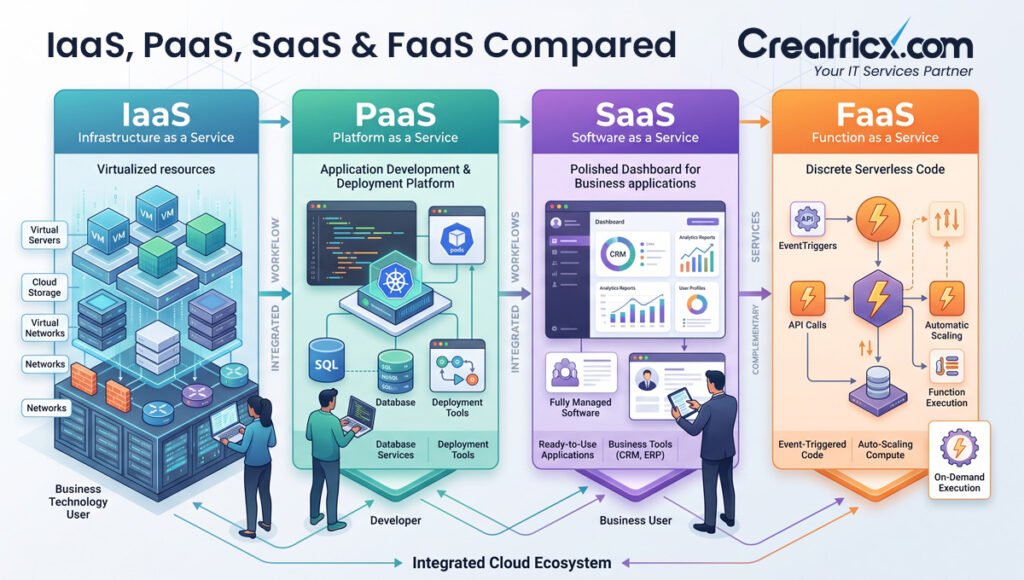
| Type | What It Means | Common Examples |
| SaaS | Ready-to-use software accessed online. The provider manages the app, hosting, updates, and infrastructure. | Google Workspace, Microsoft 365, Salesforce, HubSpot, Shopify |
| IaaS | Cloud infrastructure like virtual servers, storage, and networking. Businesses get more control but also more responsibility. | AWS EC2, Azure Virtual Machines, Google Compute Engine |
| PaaS | A cloud platform where developers can build, test, and deploy applications without managing full server infrastructure. | Google App Engine, Azure App Service, Heroku |
| Serverless | A model where developers run code without managing servers directly. The provider handles scaling and infrastructure. | AWS Lambda, Google Cloud Functions, Azure Functions |
| Cloud Storage | Online storage for files, documents, media, and shared business data. | Google Drive, Dropbox, OneDrive |
| Cloud Backup | Remote backup systems that protect data and help recover files after loss, damage, deletion, or system failure. | Backblaze, Acronis, cloud backup platforms |
SaaS Cloud Services Examples
SaaS, or Software as a Service, is one of the most common types of cloud services. It means you use software through the internet instead of installing and maintaining it on your own computers or company servers.
This is the type of cloud service most people already understand, even if they don't call it SaaS, because apparently technology needed one more acronym to make normal tasks sound expensive.
9 common SaaS examples include:
- Google Workspace for Gmail, Google Docs, Google Sheets, Drive, and team collaboration
- Microsoft 365 for Outlook, Word, Excel, Teams, OneDrive, and business productivity
- Salesforce for customer relationship management and sales pipelines
- HubSpot for CRM, marketing, sales, and customer support tools
- Shopify for creating and managing e-commerce stores
- QuickBooks Online or Xero for accounting and finance management
- Slack for team messaging and workplace communication
- Zoom for online meetings and video calls
- Canva for cloud-based design and content creation
The main benefit of SaaS is convenience. The provider manages hosting, updates, security patches, backups, and performance. The user simply logs in and uses the software.
For businesses, SaaS can reduce setup time, lower maintenance work, and make remote access easier. A team can work from different locations, share files, manage customers, attend meetings, and track projects without relying on one office computer or one local server sitting in a corner like a fragile little disaster waiting to happen.
IaaS Cloud Services Examples
IaaS, or Infrastructure as a Service, gives businesses access to cloud infrastructure such as virtual servers, storage, networking, and computing power. Instead of buying physical servers and keeping them in an office or data centre, a business rents infrastructure from a cloud provider.
This is useful for companies that need more control than SaaS provides. With IaaS, the provider manages the physical hardware, but the business or technical team usually manages the operating systems, applications, databases, and configurations.
8 common IaaS examples include:
- AWS EC2 for renting virtual servers
- Microsoft Azure Virtual Machines for running cloud-based workloads
- Google Compute Engine for scalable computing resources
- DigitalOcean Droplets for hosting apps, websites, and developer projects
- Amazon S3 for cloud-based object storage
- Azure Storage for storing files, backups, and application data
- Google Cloud Storage for scalable data storage
- Cloud-based networking tools for firewalls, load balancing, and private networks
Businesses use IaaS for things like website hosting, app hosting, databases, backup environments, development systems, disaster recovery, and high-traffic platforms.
For example, an e-commerce company might use cloud infrastructure to host its website, store product images, manage customer data, and scale resources during seasonal sales. Instead of buying more servers "just in case," the business can increase cloud capacity when needed, a fairly shocking concept: paying for what you actually use instead of worshipping a dusty server rack.
PaaS Cloud Services Examples
PaaS, or Platform as a Service, gives developers a ready-made cloud environment for building, testing, deploying, and managing applications. Instead of setting up servers, operating systems, databases, and deployment tools from scratch, developers use a cloud platform that already provides much of that foundation.
In simple terms, PaaS is useful when a business wants to build software without wasting time managing every technical layer underneath it. Because apparently writing the actual app wasn't enough, someone also had to babysit servers, updates, runtime environments, and deployment pipelines.
8 common PaaS examples include:
- Google App Engine for building and hosting web applications
- Azure App Service for deploying websites, APIs, and backend apps
- Heroku for launching apps quickly without managing servers directly
- AWS Elastic Beanstalk for deploying and scaling applications
- Firebase for app development, authentication, databases, and hosting
- Render for hosting web apps, APIs, databases, and background workers
- Vercel for deploying frontend applications and modern web projects
- Netlify for hosting static websites, frontend apps, and serverless functions
Businesses use PaaS when they need faster development, easier deployment, and less infrastructure management. It's common for startups, SaaS companies, app developers, internal business tools, and teams building custom platforms.
For example, a company building a customer portal might use a PaaS platform to deploy the application, connect it to a database, manage user authentication, and scale it as more customers join. The technical team can focus more on features and user experience instead of manually configuring every server setting.
Cloud Storage And Backup Examples
Cloud storage and cloud backup are two of the most familiar cloud services, but they aren't exactly the same thing. Naturally, technology gave us two similar concepts so businesses could confuse them during important decisions.
Cloud storage is used to save, access, and share files online. Cloud backup is used to protect copies of important data so it can be recovered if files are deleted, damaged, lost, or affected by system failure.
5 common cloud storage examples include:
- Google Drive for storing documents, images, videos, and shared business files
- Dropbox for file sharing, syncing, and team access
- Microsoft OneDrive for storing files connected to Microsoft 365
- iCloud for Apple device storage and file syncing
- Box for secure business file sharing and collaboration
5 common cloud backup examples include:
- Backblaze for automatic computer and business data backup
- Acronis for cloud backup, cyber protection, and recovery
- Carbonite for business backup and file recovery
- AWS Backup for protecting cloud workloads and application data
- Azure Backup for backing up Microsoft cloud and hybrid systems
The main difference is purpose. Storage helps teams use and share files day to day. Backup helps protect data when something goes wrong.
A shared Google Drive folder might help a team work faster, but it shouldn't be the only protection for critical files. Proper backup planning should include recovery options, access control, version history, and a clear process for restoring data when someone accidentally deletes half the company folder.
Public, Private, And Hybrid Clouds: Examples
Cloud services can also be classified according to the configuration of the cloud environment. There are three widely used models: private cloud, public cloud, and hybrid cloud. The underlying cloud technology is largely the same; what changes is the level of ownership and control. Because naturally, one explanation just wasn't enough. We also needed models for deployment.
Public Cloud
A public cloud is a cloud environment shared among many users and businesses. Businesses use the services through the internet, and the infrastructure is owned and managed by a provider.
Five typical examples are:
- AWS
- Microsoft Azure
- Google Cloud Platform (GCP)
- IBM Cloud
- Oracle Cloud
Websites and applications are often hosted on the public cloud, as are file storage, databases, analytics, AI tools, and business software. This is often more cost-effective and flexible, since companies do not have to buy and maintain their own physical servers.
Private Cloud
A private cloud is a cloud environment used exclusively by one organisation. It can be hosted at the organisation's own data centre or hosted by a third-party provider.
Companies that need more control over data, security, compliance, or internal systems often use private clouds. Examples include banks, health organisations, government agencies, and larger companies that handle more sensitive data.
Hybrid Cloud
A hybrid cloud is a blend of public cloud services and private cloud systems. A business can use public cloud tools for websites, apps, backups, analytics, or customer-facing systems while keeping sensitive data on a private, more controlled system.
For example, a company might keep its private financial records in a private cloud but host its public website and customer portal on Microsoft Azure or AWS.
Many growing businesses find hybrid cloud a practical answer. It sits at the sweet spot between control, flexibility, and scalability, without everything having to be crammed into one configuration.
Why Cloud Services For Business?
Cloud services give businesses technology that's easy to access, easy to scale, easy to manage, and easy to update. Instead of buying physical servers, installing software on every machine, and being tied to one office, companies can use online systems that flexibly support remote teams, websites, apps, data, and customers.
The main advantages are:
- Lower hardware costs by reducing the physical equipment a business needs to buy and maintain
- Easier scaling as storage, users, traffic, or computing needs grow
- Teams able to work together from a variety of locations with remote access
- Better collaboration through cloud software, shared files, and real-time updates
- Faster deployment of internal systems, business tools, apps, and websites
- Automatic updates for many cloud-based software applications
- Backup and recovery options for critical files and systems
- Improved uptime when services are hosted on reliable cloud infrastructure
- Better support for automation and AI, which many modern tools rely on
- Flexible pricing, either subscription-based or pay-as-you-use, to suit different needs
For example, a small business might use Microsoft 365 for email, Dropbox for file sharing, Shopify for its online store, and cloud hosting for its website. A larger company might use AWS or Azure for applications, databases, backups, analytics, and internal systems.
The point isn't that every business should move everything to the cloud immediately, that's how people create expensive chaos with login screens. The point is to use cloud services where they make operations faster, safer, more scalable, or easier to manage.
How To Choose The Right Cloud Service
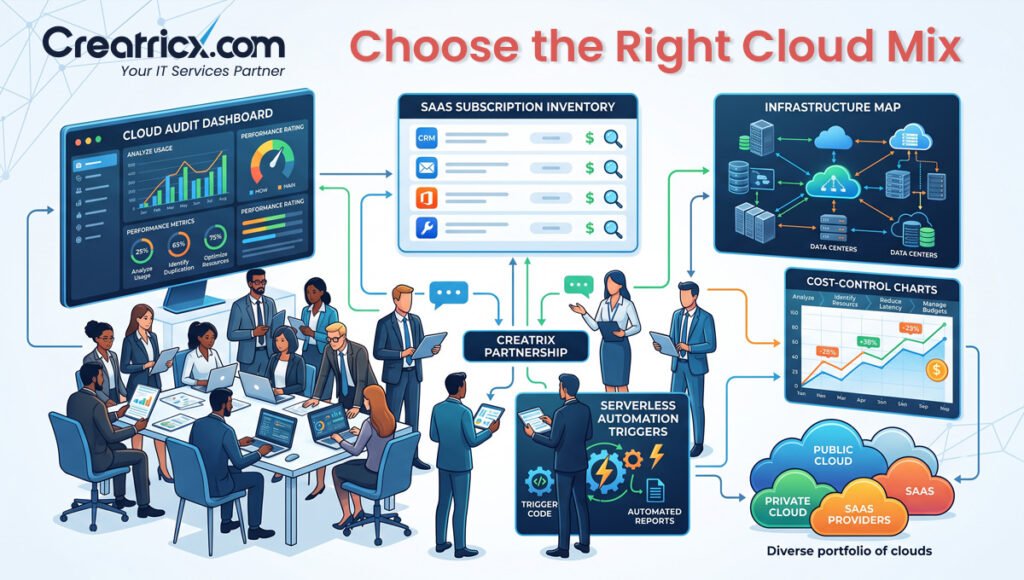
Choosing the right cloud service starts with knowing what problem you're trying to solve, not simply deciding "we need cloud." That's a bit like saying "we need tools" and then buying a forklift for a leaking tap. Start with the business need first, then work through the following steps.
Step 1: Define What You Actually Need
Work out what you need the cloud service for, file storage, website hosting, app development, backups, security, customer management, communication, or business software.
Step 2: Decide How Much Control You Need
If you only need ready-to-use software, SaaS tools like Microsoft 365, Google Workspace, HubSpot, or Shopify may be enough. If you need custom hosting or technical control, IaaS or PaaS may be a better fit.
Step 3: Check Security Requirements
Review access controls, encryption, user permissions, backup options, compliance needs, and account protection features before committing to any provider.
Step 4: Confirm It Will Scale With You
The service should be able to handle more users, storage, traffic, or workloads as the business grows, not just cope with today's requirements.
Step 5: Work Out The Real Cost
Look beyond the starting price. Check storage limits, user fees, bandwidth, support costs, upgrades, and any hidden usage charges.
Step 6: Decide Who Will Manage It
Some cloud tools are simple enough for internal teams to run. Others need developers, IT support, or a managed cloud provider.
Step 7: Check It Connects With Your Current Systems
A cloud service should fit your website, CRM, email, accounting tools, analytics, apps, and existing team workflows.
Step 8: Plan For When Something Goes Wrong
Check backup recovery, support response times, uptime history, security features, and disaster recovery options before you commit.
The right cloud service isn't always the biggest or most popular one. It's the one that fits your business goals, budget, security needs, technical capacity, and future growth plans.
Frequently Asked Questions
What are cloud services in simple words?
Cloud services are online technology services that let businesses use software, storage, servers, databases, backups, and security tools through the internet instead of managing everything on physical computers or office servers. The technology still exists somewhere real, just not under someone's desk collecting dust.
What are some common examples of cloud services?
Popular examples include Google Drive, Dropbox, Microsoft 365, Google Workspace, Shopify, Salesforce, HubSpot, AWS, Microsoft Azure, Google Cloud, Zoom, Slack, and cloud backup tools. These cover file storage, communication, customer management, e-commerce, hosting, backups, and application development.
What are the three main types of cloud services?
The three major types are SaaS, PaaS, and IaaS. SaaS is software that's already installed and ready to use. PaaS is a platform for developing and deploying applications. IaaS provides cloud infrastructure, such as servers, storage, and networking.
What's the difference between SaaS, PaaS, and IaaS?
SaaS gives users ready-made software, such as Shopify and Google Workspace. PaaS gives developers a platform to build and deploy applications, such as Azure App Service and Heroku. IaaS lets businesses rent infrastructure, such as Azure Virtual Machines and AWS EC2.
Is Google Drive a cloud service?
Yes. Google Drive lets users store files on the internet, access them from different devices, share folders, and work with others online. It's primarily a file storage and sharing cloud service.
What is cloud storage?
Cloud storage is an online service that lets you store files on the internet instead of on your computer or a physical storage device such as a hard drive. Examples include Dropbox, Google Drive, OneDrive, iCloud, and Box, and it makes it easy to access, share, sync, and collaborate on files.
Are cloud services secure?
Cloud services can be secure when configured properly, but they aren't automatically safe just because they're “in the cloud.” Businesses still need strong passwords, multi-factor authentication, access control, backups, monitoring, and clear security policies.
How do I know which cloud service my business needs?
Start by identifying the problem you're trying to solve. Choose SaaS for business software, cloud storage for accessing files, IaaS or PaaS for hosting a website or app, and cloud backup and recovery for data protection. For more complex situations, managed cloud support is usually the safer route.
Disclaimer
This article reflects general industry practice around cloud service types and providers as of 2026, alongside Creatricx's published service model. Individual pricing, features, and provider terms change frequently. Always confirm current details directly with any cloud provider before committing to a plan.
Final Thoughts
Cloud services are online technology resources that help businesses use software, storage, servers, databases, backups, security tools, and development platforms without managing everything on local hardware. In simple terms, the cloud lets businesses access the technology they need through the internet.
Examples include Google Drive for storage, Microsoft 365 for business productivity, Shopify for e-commerce, Salesforce for CRM, AWS for hosting, Azure for infrastructure, and Google Cloud for apps, data, and development tools.
The important thing to understand is that "cloud services" isn't one single product. It can mean ready-to-use software, cloud storage, app hosting, development platforms, backup systems, security tools, or full infrastructure. That's why businesses should choose cloud services based on their actual needs, not just because the word "cloud" sounds modern.
A good cloud setup makes work easier, safer, more scalable, and more cost-aware. A poor setup can create security risks, wasted spending, access problems, and backup confusion. The real question isn't only "what are cloud services?" It's "which cloud services does this business actually need, and who's managing them properly?" Used well, cloud services can support websites, apps, remote teams, customer systems, automation, data protection, and long-term growth.