

Creatricx uses business process automation to identify repetitive, time-consuming tasks and replace them with AI-driven workflows, freeing up staff hours, reducing manual errors, and cutting operational costs without requiring businesses to hire in-house automation specialists.
Key Takeaways
- Business process automation replaces repetitive manual tasks with AI-driven workflows that run consistently without ongoing human input
- Creatricx identifies automation opportunities through a discovery process before recommending any tools or workflow changes
- Common automation targets include data entry, customer support responses, reporting, invoicing, and lead qualification
- Automation is implemented gradually, tested against real workflows, and monitored after launch to avoid disrupting existing operations
- Businesses typically see time savings within weeks rather than months, since automation targets narrow, well-defined tasks first
Table of Contents
What Business Process Automation Actually Means
Business process automation, often shortened to BPA, uses software and AI tools to carry out tasks that would otherwise require a person to complete manually and repeatedly. This covers a wide range of work: sorting and responding to routine customer enquiries, generating reports from existing data, updating spreadsheets, scheduling, invoicing, and qualifying inbound leads before they reach a sales team.
The goal isn't to remove people from the process entirely. It's to remove the repetitive, low-judgement parts of a process so staff time gets spent on the tasks that actually require human decision-making.
Automation works best on tasks that are repetitive, rule-based, and high in volume. Tasks requiring nuanced judgement or relationship-building are generally poor automation candidates and are better left with your team.
How Creatricx Approaches Automation
Creatricx doesn't start an automation engagement by recommending tools. It starts by mapping out how a business currently operates, identifying where time is being lost, and then matching automation to those specific bottlenecks, this avoids a common failure mode in automation projects: buying software first and trying to force existing processes to fit around it.
Businesses that skip this step often end up with automation tools that technically work but don't actually solve the underlying time-drain, since the tool was chosen before the problem was properly understood.
A frequent automation mistake is trying to automate a broken process. If a workflow is inefficient or poorly defined to begin with, automating it usually just makes the same mistakes happen faster and at greater scale. Fixing the process should come before automating it.
Where Automation Typically Saves The Most Time
Certain categories of business task consistently produce the biggest time savings once automated:
Data entry and data transfer between systems that don't natively integrate
Routine customer support responses to frequently asked questions
Report generation that currently requires manually pulling data from multiple sources
Invoice creation, sending, and payment reminders
Initial lead qualification before a sales conversation begins
Scheduling and calendar coordination across teams or time zones
Businesses often start with just one of these categories before expanding automation to others, which limits risk and makes it easier to measure the impact of each change individually rather than trying to automate everything simultaneously.
One client working with Creatricx on automation reduced lead-generation costs by 45% after automating initial lead qualification, freeing the sales team to focus only on qualified prospects rather than manually screening every inbound enquiry.
The Creatricx Automation Process
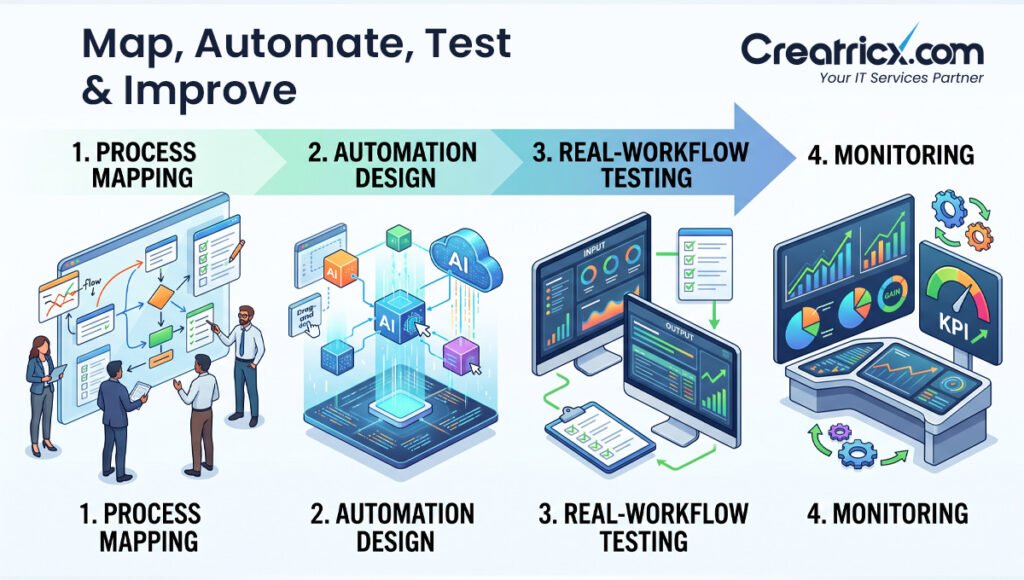
Step 1: Discovery and Process Mapping
Creatricx reviews current workflows with the client to identify where time is being spent on repetitive tasks and where errors or delays commonly occur.
Step 2: Automation Design
A specific automation approach is designed for each identified bottleneck, using tools suited to the existing systems already in place rather than requiring a full platform replacement.
Step 3: Testing Against Real Workflows
Automated workflows are tested against real data and real scenarios before being rolled out fully, reducing the risk of disruption to day-to-day operations.
Step 4: Rollout and Monitoring
Once live, automated processes are monitored for accuracy and performance, with adjustments made as the business's needs change over time.
Automation implementation timelines vary depending on the complexity of existing systems and how many processes are being automated at once. Confirm a specific timeline with Creatricx during your discovery consultation.
Manual Process Vs Automated Process

| Factor | Manual Process | Automated Process with Creatricx |
|---|---|---|
| Speed | Limited by staff availability and working hours | Runs continuously, including outside business hours |
| Consistency | Varies by individual staff member | Consistent output every time |
| Error rate | Higher, particularly for repetitive data entry | Lower, once workflows are properly tested |
| Scalability | Requires hiring more staff to handle more volume | Scales without proportional headcount increases |
| Staff time | Spent on repetitive, low-judgement tasks | Redirected to higher-value work |
Measuring The Return On Automation
Staff Time Reclaimed
Measure the hours recovered each week after automation.
Error Rate
Compare mistakes and rework before and after implementation.
Cost per Task
Track the manual cost against the automated equivalent.
A common question businesses ask before committing to automation is how to measure its actual impact. Creatricx typically frames this around a few concrete metrics rather than vague impressions: hours of staff time reclaimed per week, error rates before and after automation, and cost per task compared to the manual equivalent. Tracking these numbers before and after implementation gives a business a clear, defensible read on the return from a given automation investment, rather than relying on a general sense that things feel more efficient. This measurement discipline also makes it easier to decide which process to automate next, since the businesses with the clearest before-and-after data tend to make faster, better-informed decisions about where to expand automation over time.
What Automation Doesn't Replace
It's worth being direct about the limits of business process automation.
Tasks that require genuine judgement, relationship management, negotiation, or creative problem-solving are generally not good automation candidates.
Automation works alongside a team, handling the repetitive groundwork so staff can spend more time on the parts of their job that actually require a person. Businesses that try to automate everything, including judgement-heavy work, typically end up with worse outcomes than businesses that automate selectively.
Automation should support judgement-heavy work, not impersonate it. Keep people responsible for negotiation, relationships, creative decisions and exceptions that do not fit clean rules.
Why Choose Creatricx for Automation
Creatricx approaches automation as a targeted efficiency tool rather than a wholesale replacement for staff. By starting with discovery and process mapping rather than tool selection, automation projects are built around what a specific business actually needs, not a generic template. This reduces the risk of paying for automation that doesn't fit the way a business actually operates, and it's part of why Creatricx frames automation as a way to save time rather than simply cut headcount.
Frequently Asked Questions
What is business process automation?
Business process automation uses software and AI tools to carry out repetitive, rule-based tasks that would otherwise require manual staff time, such as data entry, reporting, or routine customer responses.
How does Creatricx decide what to automate first?
Creatricx starts with a discovery process, mapping existing workflows to identify where time is being lost before recommending specific automation tools or approaches.
Will automation replace staff roles?
Automation is generally designed to remove repetitive tasks from a role, freeing staff time for higher-judgement work, rather than replacing roles outright.
How long does it take to see results from business process automation?
Many businesses see measurable time savings within weeks, since automation typically targets narrow, well-defined tasks first rather than overhauling entire departments at once.
What kinds of tasks are best suited to automation?
Repetitive, rule-based, high-volume tasks such as data entry, invoicing, lead qualification, and routine customer support responses are generally strong automation candidates.
Can automation work with our existing software systems?
Creatricx typically designs automation around a business's existing systems rather than requiring a full platform replacement, where feasible.
What happens if an automated process doesn't perform as expected?
Automated workflows are tested against real data before full rollout, and continue to be monitored after launch, with adjustments made as needed.
Is business process automation only useful for large companies?
No. Automation is often most valuable for smaller and growing businesses that don't have the staff capacity to absorb repetitive manual work at scale.
Disclaimer
This article reflects Creatricx's published service model and client outcomes as presented on creatricx.com at the time of writing. Individual results vary by business, process complexity, and existing systems. Always confirm current scope, pricing, and timelines directly with Creatricx before engaging automation services.
In Summary
Business process automation, when implemented thoughtfully and with proper testing, is less about replacing people and more about protecting their time for higher-value work. Creatricx's approach of mapping processes before recommending tools, testing before full rollout, and monitoring after launch reflects a broader principle worth applying to any automation project regardless of provider: automation should be built around how a business actually works, not the other way around.
For businesses deciding if a process is worth automating, starting with a clear picture of where time is genuinely being lost is a more reliable guide than starting with a list of available tools. The businesses that get the most value from automation tend to be the ones that treat it as an ongoing practice rather than a one-off project, revisiting workflows periodically as their operations grow and change.