


UX designers develop and enhance the user flow on websites, applications, and digital products. They investigate user needs, map journeys, design wireframes, test prototypes, uncover usability problems and minimize friction so customers can more easily perform tasks like joining up, booking, buying or accessing features.
6 Key Points
- UX designers think on the entire user journey, not just what a screen looks like.
- They make websites, apps and platforms easier to comprehend, navigate and utilize.
- UX work comprises research, user flows, wireframes, prototypes, usability testing and experience upgrades.
- A good UX designer combines user needs with business goals, because even the most seamless experience still needs to enable inquiries, sales, sign-ups, bookings, or product use.
- UX design may eliminate misunderstanding, enhance conversions, reduce development rework, and make digital things feel more helpful.
- Businesses often require UX help before they construct, revamp or scale a website, app, dashboard, SaaS product or e-commerce experience.
Table of Contents
What Is a UX Designer?
A UX designer is the person who plans how a digital product should work for the people using it. Their focus isn’t decoration. It’s clarity, flow, behaviour, and whether users can complete what they came to do without feeling like the interface was designed during a power outage.
UX designers work on websites, mobile apps, SaaS platforms, dashboards, portals, e-commerce stores, and other digital products. They look at what users need, where they get stuck, and how each step in the journey can feel simpler.
Their job frequently begins before visual design or development. A UX designer might lay out site layout, user flows, wireframes, content order, form stages, navigation paths, and prototype interactions to give the product a clear foundation before anyone starts constructing.
In simple terms, a UX designer helps make sure a digital product isn’t just available online, but actually usable.
What Is UX Design?
UX designers analyze user interaction with a digital product and then optimize the experience to make it clearer, faster, and less unpleasant. Their work generally takes place at the crossroads of user needs, corporate goals, design decisions, and planning for development. One role, of course, is to translate all that, because chaos needs a management.
A UX designer could be working on:
User research
discovering what people need, what they expect, and where they have problems.
User flows
The steps a user takes to execute an action such as booking a call, registering an account, buying a product or using a dashboard feature.
Information architecture
The way we structure sites, menus, categories and content so consumers can locate stuff without becoming a detective.
Wireframes
Developing rough draft versions of layouts that indicate where content, buttons, forms and important actions will be positioned before visual design.
Prototypes
Developing clickable copies of a website or app flow that teams may test before development.
Usability testing
Observing users or stakeholders interacting with a design and identifying moments of confusion or difficulty.
Experience improvements
Optimizing forms, checkout stages, onboarding flows, navigation, filters, search, dashboards, and product journeys.
UX designers also collaborate closely with UI designers, developers, marketers, product managers and business owners. They want to make sure the end product is not only visually polished, but easy to grasp and helpful in real circumstances.
UX Designer vs UI Designer
A UX designer focuses on how the experience works. A UI designer focuses on how the interface looks and feels. The two roles often work together, but they solve different parts of the same problem.
| Area | UX Designer | UI Designer |
|---|---|---|
| Main focus | User journey and usability | Visual interface and interaction style |
| Core question | Can users complete the task easily? | Does the interface look clear and consistent? |
| Main work | Research, flows, wireframes, testing, structure | Screens, colours, typography, buttons, icons, spacing |
| Output | Journey maps, user flows, wireframes, prototypes, UX findings | Polished interface designs and visual components |
| Business value | Reduces friction and improves task completion | Builds trust and makes the product feel professional |
A UX designer may decide that a checkout needs fewer steps. A UI designer then makes those steps look clean, readable, and easy to interact with. One improves the route. The other makes sure the route doesn’t look like it was built by a committee in a basement.
How the UX Design Process Works
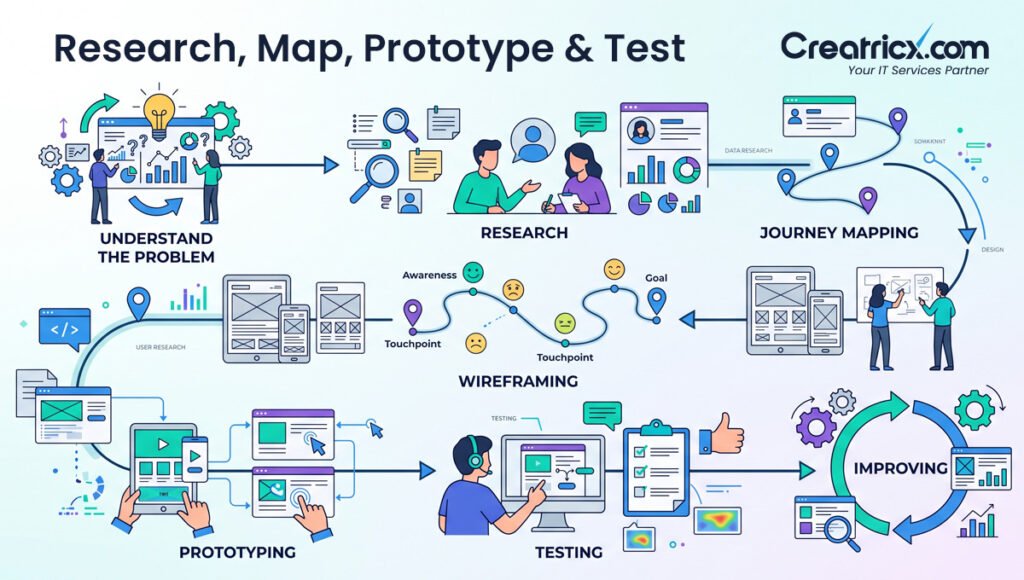
The UX design approach helps organizations go from assumptions to more informed decisions. UX designers follow a systematic path instead of guessing what people want and being astonished when the product fails.
1. Know the Problem
First, the UX designer understands what has to be improved or produced. This could be corporate goals, user problems, product requirements, technical constraints and what a user has to do.
2. Understand Your Users
The designer then looks at user behaviour, needs, questions and pain-points. This can be derived via interviews, surveys, analytics, help tickets, rival reviews, or data already on the website.
3. Map your journey
Then the designer charts the user’s journey across the product. It illustrates where users start, what they do, where they might stop and what might hinder them from completing the assignment
4. Wireframes Design
Wireframes are coarse frameworks that are prepared before visual design. They assist teams to agree on page parts, content arrangement, forms, buttons and navigation without being sidetracked by the colours and dazzling drama of design.
5. Prototype
A prototype is a user flow that may be clicked through. It allows teams to test the user experience before developers spend time constructing the final product.
6. Test and Refine
UX designers watch consumers or stakeholders using the prototype. The design is improved before development starts when individuals get confused, miss essential tasks or have trouble with a step.
A solid UX approach saves time since problems are found early when they are easier and cheaper to address.
8 UX Design Deliverables
UX designers don’t merely say “better experiences” and hide in a Figma file. They usually produce clear deliverables that tell teams what to develop, change or test.
Typical UX Deliverables:
User personas
Short descriptions of the primary user categories, their goals, needs, frustrations and decisions.
User journey mapping Visual representation of user journeys Before, During and After Using a Website, App or Platform.
Site maps
Blueprints that show how pages, categories and sections should be organized.
User flows
The steps individuals take to sign up, schedule a call, fill up a form or buy a product.
Wireframes
Basic layouts that describe the page layout, order of information, buttons, forms, and navigation without any visual design.
Clickable prototypes
Interactive mockups that let teams test the feel of experience before development begins.
Usability Findings
Notes from testing that demonstrate where users become stopped, confused, or slowed down.
UX audit reports
Reviews of the present site, app, or platform with suggestions on how to improve the experience.
These deliverables remove the guess work out of a project. Teams learn more about the needs of the users and how the product may help them, rather than opinions.
Why UX Designers Matter for Business Websites and Apps
UX designers matter because users don’t care how much effort went into a website or app if the experience feels confusing. They care whether they can find the right information, understand the next step, and complete their task without wrestling with the screen like it personally insulted them.
For a business, UX design can directly affect how well a digital product performs.
Poor UX can lead to:
Risk 1
Visitors leaving before they understand the offer
Risk 2
Forms being started but not completed
Risk 3
Users abandoning checkout or sign-up steps
Risk 4
Customers asking support teams basic questions
Risk 5
People missing important buttons, links, or features
Risk 6
Development teams rebuilding flows that should’ve been planned earlier
Strong UX design helps prevent these problems by making the journey clearer from the start. It gives users a smoother path from interest to action, whether that action is booking a call, requesting a quote, buying a product, creating an account, or using a software feature.
For websites, UX helps improve navigation, page structure, mobile usability, and lead generation paths. For apps and SaaS platforms, UX helps users understand features, complete onboarding, and keep using the product without needing a manual thicker than human patience.
Good UX design doesn’t guarantee business growth on its own, because sadly websites still need traffic, offers, pricing, and trust. But without good UX, even strong marketing can lose users at the final step.
When Should a Business Hire a UX Designer?
A business should hire a UX designer when users aren’t moving through its website, app, or platform the way they should. Sometimes the issue isn’t the offer, traffic, or design style. It’s the journey itself quietly sabotaging everything like a tiny digital villain.
UX support is especially useful in these situations:
Before building something new
If you are developing a website, mobile app, SaaS platform, portal or e-commerce store, UX should be done before development. It’s helpful to outline the structure, user flows, page order and important activities before you throw money at the code.
When Users Leave Too Fast
If analytics report high exits, brief visits, or minimal engagement, users may not be understanding the value, navigation, or next action well enough.
When forms, checkout or signups don’t work
Users may not be able to complete an action if the labels are unclear, there are too many steps, the CTA is weak, or error messages are misleading.
When clients keep asking the same old questions
Repeated questions usually suggest the site or product is not explaining things clearly. UX design can enhance content flow, page structure, and navigation.
When redesigning an old product
A redesign shouldn’t only change the visual style. UX helps identify what needs to be simplified, removed, reorganised, or rebuilt.
When scaling a digital product
As more features, pages, products, or user types are added, UX becomes more important. Without it, the product can turn into a maze with branding guidelines.
Bringing a UX designer in sooner could help eliminate misunderstanding, expensive reworking of sites, and can give consumers a clearer route from when they first arrive to when they do whatever it is that you want them to do.
What Skills Do UX Designers Use?
UX designers use research, planning, communication, and testing skills to understand what users need and turn that into clearer product experiences. It isn’t just “being creative.” That would be far too convenient for everyone involved.
A good UX designer needs to understand both people and products. They look at user behaviour, business goals, content structure, and technical limits, then shape a journey that makes sense before the product reaches development.
Important abilities for UX design:
| Skill | Why It Matters |
|---|---|
| User research | Helps designers discover true consumer wants, pain points and expectations instead of guessing. |
| Problem solving | Make complex travels, weak forms, bad navigation, ambiguous flows easy. |
| Information architecture | Organizes pages, menus, categories and content so people can locate what they need faster. |
| Wireframing | It creates basic layouts that illustrate structure before visual design elements are incorporated. |
| Prototyping | Lets teams test clickable flows before development. |
| Usability testing | Identifies where users are stuck, confused or slowed down. |
| Analytics knowledge | Helps link user behaviour with real improvements e.g. drop-offs, exits or failed actions. |
| Communication | Helps UX designers explain decisions clearly to business owners, developers, marketers, and stakeholders. |
UX designers don’t need to master every technical tool in existence. What matters most is their ability to understand users, identify friction, and design a clearer path from problem to action.
How UX Designers Work With Developers
UX designers and developers collaborate to create a functional digital product that brings the planned user journey to life. The UX designer defines structure, flow and intended behaviour . The developer builds it so people can really do things with it.
Usually, it begins with a clean handoff. The UX designer provides wireframes, user flows, prototypes, notes and interaction information so the development team knows what each screen has to do, and how users need to navigate through it.
A good UX handoff explains things like:
- When a user hits a button, what happens?
- What are the steps in a form, checkout, booking flow or onboarding procedure
- How error, confirmation, empty states, and success messages should look
- What are the most significant user paths?
- What needs to change on desktop, tablet and mobile
- What portions of the experience need to be kept simple because consumers aren’t here to solve a puzzle created by a committee
Why this collaboration matters: Lack of clarity in UX produces confusing development. Developers may create the wrong flow, overlook important interactions, or have to rewrite elements of the product later down the road. Good UX planning helps to avoid delays and confusion and to get the end product further away from what users really need.
UX designers design the experience, developers make it happen. When both sides work together early, the final website, app or platform is often easier to design, test, launch and improve.
Plan UX Before Development
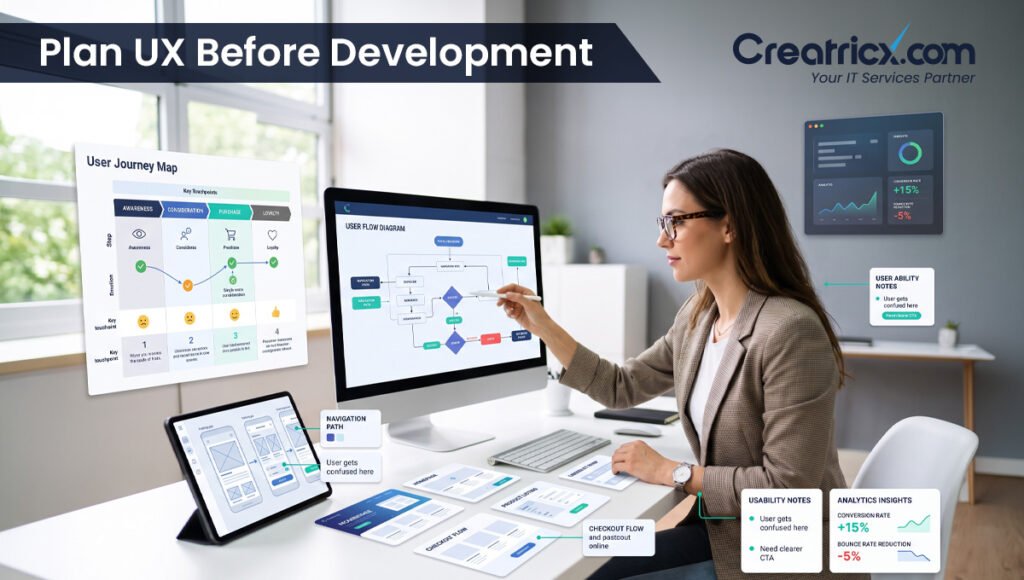
Building a website, app, or platform without UX planning often leads to unclear flows, extra revisions, and features that don’t match how users actually behave. That’s how projects become expensive guessing games with nicer fonts.
Creatricx helps businesses plan user journeys, wireframes, prototypes, and product experiences before development starts. This gives your team a clearer structure to build from, reduces rework, and helps the final product feel easier for users from the first interaction.
FAQs About What UX Designers Do
What does a UX designer do daily?
A day in the life of a UX designer is rarely the same but it involves learning how people use a product. From there, they outline user journeys, develop wireframes and construct prototypes to explore design ideas. As input rolls in, they iterate on layouts, fix usability problems, and collaborate with developers and others to translate those ideas into a more seamless, intuitive experience for users.
Is UX design the same as UI design?
No. UX design is about the user journey, structure, and usability. While UI design is about the visual part of the interface such colours, fonts, buttons, icons and layouts of screens. They work with each other, yet they don't do the same work.
Do UX designers need to code?
UX designers typically don’t code but knowing how development works can help them design more realistic processes and communicate better with developers. UX designers main work includes research, planning, wireframing, prototyping and testing.
What tools do UX designers use?
UX designers often use tools such as Figma, FigJam, Miro, Adobe XD, Sketch, Hotjar, Google Analytics, Maze, and usability testing platforms. The tool matters less than the thinking behind it, which is tragic news for people who collect software subscriptions like trophies.
Why is UX design important?
Why is UX design important? Users will leave a website or app if it’s unclear, slow, or hard to use. Good UX allows customers to comprehend the product, navigate it simply, and do things like join up, book, buy or submit a form.
When to do UX design in a project?
UX design should be done before development starts. It helps establish user flows, page layout, wireframes and important interactions early so teams don’t waste time implementing things that need to be updated later.
Can UX design enhance conversions?
Yes, UX design can certainly help with conversions by addressing the pain points in critical user journeys. More consumers can finish key tasks with better navigation, shorter forms, smoother checkout steps, stronger content flow, and easier mobile experiences.
What is the distinction between UX design and product design?
UX design is the user experience of a website, app or digital product. Product design is generally a larger phrase, and may include UX, UI, product strategy, feature planning, business goals and long-term product improvements.
Final Thoughts
UX designers help make digital products easier to understand, easier to use, and more useful for real people. They research user needs, plan journeys, create wireframes, test prototypes, and improve the points where users get stuck.
For businesses, this work matters because confusing experiences quietly lose leads, sales, sign-ups, and product users. No dramatic warning, no flashing siren, just users leaving because the journey asked them to think too hard.
A skilled UX designer connects company goals with user needs. This means cleaner website pages, more fluid app flows, better onboarding, easier forms, more seamless checkout experiences and less expensive modifications throughout development.
Creatricx helps businesses improve user journeys for websites, mobile apps, SaaS platforms, dashboards, portals, and e-commerce experiences with professional UX design support.