
Small-Business Automation Budget Lab
Affordable Software Is Easy. Affordable Implementation Takes Discipline.
AI marketing automation can begin with free or low-cost tools, but the real budget includes setup, data cleanup, usage limits, integration work, monitoring and human review. This guide separates the licence price from the cost of making the workflow dependable.
$19.99
Zapier Professional starting price
$800
HubSpot Marketing Hub Professional starting price
$36
Litmus average email ROI per $1 spent
1 Workflow
The safest place for a small business to start
Yes. AI marketing automation can be affordable for a small business in 2026, but “affordable” depends on the workflow, contact volume, usage model and implementation effort. Current platforms range from free plans and low-cost task automation to professional suites costing hundreds of dollars per month plus onboarding. A sensible small-business plan often starts below $100 in monthly software, while a connected CRM, email and workflow stack may land between $100 and $500 before custom implementation. The useful question is not whether the software is cheap. It is whether one specific workflow creates more measurable value than it costs to build, run and maintain.
Key Takeaways
Finding 01
Entry costs are genuinely accessible
Free plans and low-cost automation tools exist, but a planning budget should include usage, implementation and review rather than only the licence.
Finding 02
Email ROI is strong, not guaranteed
Litmus continues to use a $36 average return per $1 spent. Its 2025 data shows a wide distribution, with many companies reporting between $10 and $50 rather than one universal result.
Finding 03
The $5.44 benchmark is older than many articles admit
Nucleus Research published the figure in 2021 after reviewing 16 ROI case studies from 2016-2020. It is useful historical evidence, not a fresh 2026 promise.
Finding 04
Small-business AI adoption depends on how it is measured
Business-level, planned-use and worker-level surveys produce very different percentages. Quoting one without its denominator is how statistics become marketing confetti.
Finding 05
Implementation remains the dividing line
The businesses most likely to waste money overbuy, skip data preparation, ignore exceptions or automate several processes before proving one.
Table of Contents
Why "affordable" Is Almost The Wrong Question
Here's the honest reframe most articles on this topic miss. Ten years ago, marketing automation genuinely was a big-budget tool, the kind of thing that needed a $10 million marketing department to justify. That's simply no longer true. The tools are cheap now, tiered for every stage of growth, and often built into software small businesses already pay for. So when an owner asks "can I afford this," the useful answer is: the entry price is almost certainly within reach, but affordability was never the thing that determined success. Implementation was, and still is.
Put plainly: a $49-a-month tool that nobody set up properly is expensive, because it delivers nothing. A $49-a-month tool wired into one well-chosen workflow can pay for itself many times over. The price tag is the least interesting variable in that equation.
The subscription is only one layer. Add setup, data cleanup, integration work, staff time, monitoring and human judgement. A cheap tool that produces errors is not affordable; it is merely inexpensive at checkout.
A helpful way to think about it: the cost of AI marketing automation isn't the subscription. It's the subscription plus setup, plus data cleanup, plus the time to learn it, plus the ongoing judgement to keep it accurate. The subscription is often the smallest line in that list, which is exactly why focusing only on the monthly price leads owners astray.
What It Actually Costs: Three Honest Tiers
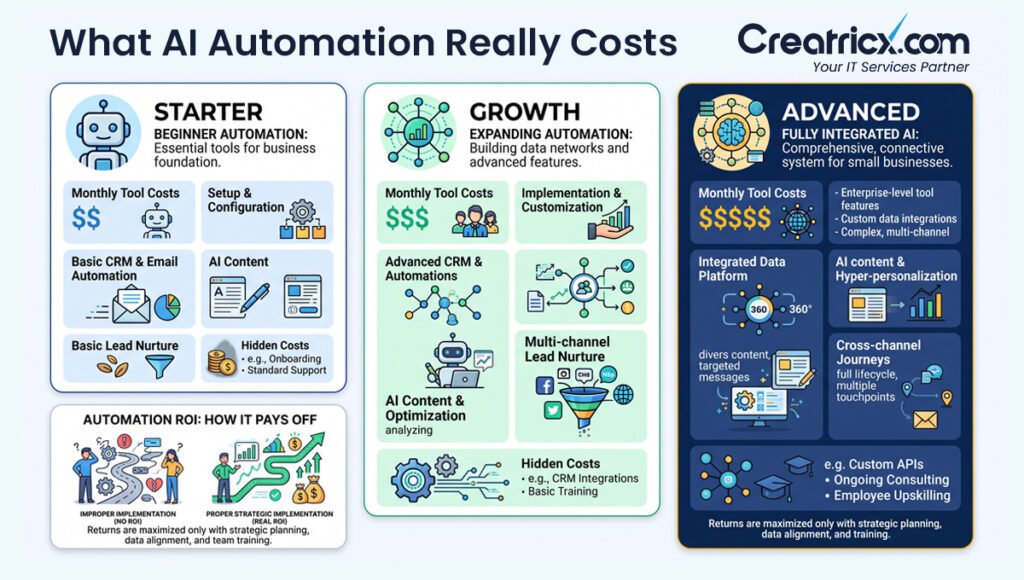
Pricing is fragmented because platforms charge by seats, contacts, email volume, tasks, credits, AI usage or some cheerful combination of all six. The following bands are useful for planning, but they are not quotes and they do not mean every business needs every layer.
| Planning Band | Typical Budget Range | What It Can Cover | What Usually Expands the Cost |
|---|---|---|---|
| Starter | $0-$100/month in software | One workflow, small list, basic email or app-to-app automation, manual review | Owner time, data cleanup, limited usage and weak monitoring |
| Growth | $100-$500/month in software and support | CRM connection, lead follow-up, segmentation, reporting and several controlled workflows | Contact tiers, task/credit usage, integrations, implementation and maintenance |
| Advanced | $500-$3,000+/month | Larger databases, multi-channel journeys, scoring, custom integrations and team governance | Onboarding, specialist support, data architecture, testing and change management |
A Current Pricing Snapshot
A few live pricing examples show why “marketing automation costs $49 a month” is both true and incomplete. Prices below are published starting points as of August 2026 and can change with billing term, usage, contacts, seats and add-ons.
| Current Example | Published Pricing Snapshot | Why the Headline Price Is Incomplete |
|---|---|---|
| Zapier | $0 free; Professional starts at $19.99/month; Team starts at $69/month | Task-based. AI steps, code and connector actions consume the shared task pool. |
| Make | $0 free plan with 1,000 credits/month; paid pricing scales by credits | Each scenario module action generally consumes a credit; unused credits expire. |
| HubSpot Marketing Hub | Starter begins at $7/seat annually or $20/seat monthly; Professional starts at $800/month | Professional also lists required one-time onboarding of $3,000. |
| Mailchimp | Pricing changes by contact tier, sends and plan | Automation depth, audience size, SMS and other add-ons affect the bill. |
Check the current vendor pages before budgeting: Zapier, Make, HubSpot and Mailchimp.
HubSpot's current Professional example is particularly useful: the plan starts at $800 per month and lists required one-time onboarding of $3,000. That is a concrete hidden cost, not a vague claim that every platform secretly costs five times its headline price.
The Advertised Price Is Not the Operating Cost
The Six-Layer Cost Stack
The Six-Layer Cost Stack
Compare platforms by total operating cost, not the cheerful number printed above the Buy button.
Licence
The base subscription, contact tier, seats or plan level.
Usage
Tasks, credits, AI calls, SMS, email sends, storage and overages.
Implementation
Workflow design, integration setup, testing, permissions and documentation.
Data preparation
Deduplication, field mapping, consent status, tagging and missing values.
Operations
Monitoring, error handling, content updates, model review and monthly maintenance.
Change cost
Training, process changes and the time needed for staff to trust and use the system.
The Return, In Numbers Worth Trusting
Affordability only matters relative to what comes back. Litmus continues to publish an average email ROI of $36 for every $1 spent, while its 2025 survey shows that reported returns vary widely. Nucleus Research found $5.44 in benefits per dollar spent across marketing-automation case studies, with payback under six months, but that research was published in 2021 and covered deployments from 2016 to 2020.
One nuance worth being honest about: these are averages, and averages hide a wide spread. A thin slice of well-built, behaviour-triggered automation does most of the revenue work, while poorly targeted bulk sends earn almost nothing. The return is real, but it's earned through good implementation, not guaranteed by the purchase.
Be sceptical of any tool or agency quoting a single guaranteed ROI figure like "get 300% returns." The credible data shows enormous variance between top and bottom performers using identical tools. The difference is never the software; it's data quality, targeting, and if a human is still steering. Anyone promising a fixed return is selling certainty that the actual data doesn't support.
Do Not Buy a Guaranteed ROI
One-Workflow Economics
Calculate the Workflow, Not the Platform
Monthly Benefit
Hours saved × loaded hourly cost, plus incremental gross profit from improved follow-up, recovery, conversion or retention.
Monthly Cost
Software + usage + maintenance + human review + setup cost amortised across its useful life.
Payback
Upfront implementation cost ÷ monthly net benefit. Do not count “hours saved” unless the business can explain where those hours go.
Hypothetical Break-Even Example
A service business spends four hours each week manually following up with new leads. At a loaded staff cost of $30 per hour, that work costs roughly $520 per month. A small automation costs $50 per month, requires $600 in setup, and needs about $30 per month of review time.
If it removes all four weekly hours, the operating benefit before any extra sales is about $440 per month. The setup cost would pay back in roughly 1.4 months. If it only saves one hour a week, the same system barely covers its operating cost. The workflow volume, not the fashionable tool logo, decides the economics.
How Common Is AI Use in Small Businesses?
The source article's 68% figure could not be supported as a clean 2026 measure of small firms using AI. Current authoritative sources tell a more useful story: adoption is growing, but the number changes sharply depending on whether the survey counts businesses, workers or companies planning to adopt.
U.S. Census Bureau
Across U.S. businesses, AI use hovered between 17% and 20% from December 2025 to May 2026. Fewer than 20% of firms with four or fewer employees reported use.
Small Business Credit Survey
A 2026 San Francisco Fed analysis found nearly 40% of small-business respondents were using or planning to use AI, based on the 2024 survey.
U.S. Chamber Worker Survey
Half of workers at small businesses reported using AI at work in 2026. That is worker-level adoption, not the percentage of small firms using integrated automation.
Do not use a worker-level statistic as if it described the percentage of firms with integrated automation. Drafting an email with an AI assistant and running a monitored CRM workflow are both called AI adoption, despite being very different operational commitments.
Different Surveys Measure Different Things
When AI Marketing Automation Is Not Affordable
Automation is not automatically economical just because the platform is cheap. It is often a poor investment when the workflow runs only a few times a month, the underlying offer does not convert, customer data is unreliable, margins are too low, nobody owns the process, or the business cannot define a measurable before-and-after result.
A workflow with low volume and high exception rates can cost more to maintain than completing the task manually. Small businesses should automate repeated, stable work first, not every task they find annoying.
The Minimum Viable Volume Test
Where Small Businesses Actually Waste Money
Since the tools are affordable, the money that gets wasted is almost never spent on subscriptions. It's lost in predictable, avoidable ways.
Overbuying
Overbuying is the most common. An owner picks an all-in-one platform with enterprise features they'll never touch, then pays for that capacity every month while using a fraction of it. The mirror-image mistake is underbuying: choosing a tool too limited for the actual workflow, which forces manual workarounds that erase the time savings the automation was supposed to deliver.
Dirty data
Skipping data preparation is the quiet budget-killer. Automation built on a messy, duplicate-ridden contact list produces messy, embarrassing output, and the cleanup often costs more than doing it right the first time would have.
Automating everything
And automating everything at once is where budgets reliably go sideways. Cost tracks with complexity, not company size, so a five-person shop trying to automate five tangled workflows simultaneously can easily outspend a larger company that automated one clean workflow well.
No workflow owner
A workflow without a named owner becomes nobody's responsibility when data changes, an integration fails or messaging needs review.
Ignoring edge cases
The happy path is cheap. Exceptions, retries, duplicate records, opt-outs and failed API calls are where the engineering cost usually appears.
Measuring activity
Email sends, generated posts and completed tasks are not ROI. Track qualified responses, conversion, retained customers, recovered revenue and staff time actually redeployed.
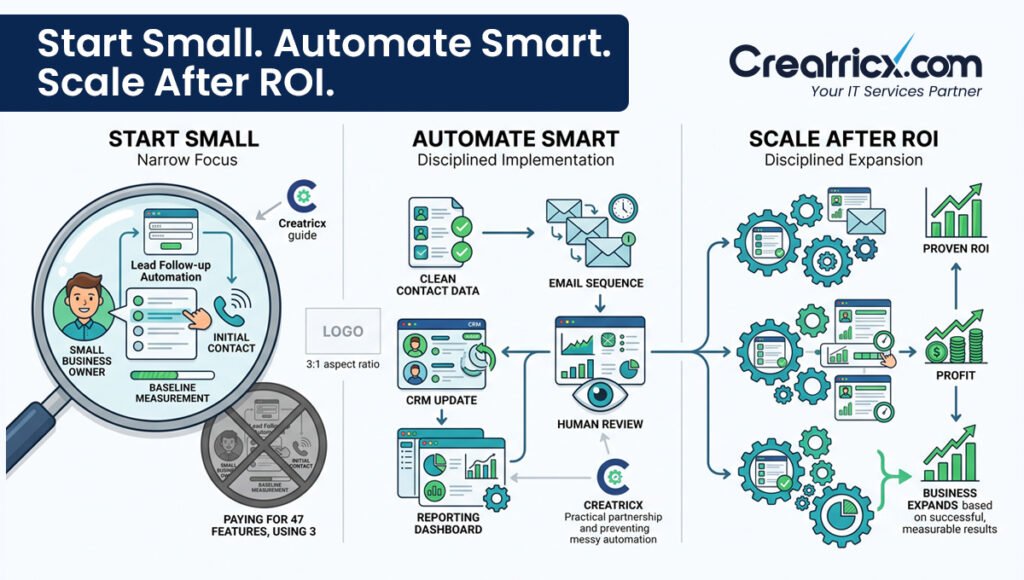
The pattern among small businesses that get real value is remarkably consistent: they start narrow, automate a single workflow, measure it against a clear baseline, prove the return, then expand. This "one workflow at a time" discipline is the single biggest predictor of automation success, and it costs nothing to adopt.
The Pattern That Protects the Budget
AI Automation Engineer's Field Notes
The Workflow Must Remain Affordable After Something Goes Wrong
Small-business automation becomes expensive when it has no error path, no owner and no record of why it made a decision. Reliable workflows are designed for failure, not only for the demo.
No-code still needs engineering
A drag-and-drop builder removes syntax. It does not remove data modelling, error handling, permissions, observability or ownership.
Usage multiplies quickly
One customer event can trigger several steps, AI calls and updates. Price the full execution path, not one trigger.
Fail closed on uncertain data
If consent, address validity, customer status or input confidence is unclear, the workflow should pause for review instead of guessing.
Build retries and alerts
APIs fail, tokens expire and fields change. A production workflow needs retries, error queues and alerts that name the failed record.
Keep a human checkpoint
Generative messages, lead scoring and customer-facing decisions need review rules proportionate to their risk.
Document the exit
The business should own the accounts, credentials, workflow diagrams, field mappings and handover notes from the start.
What Practitioners Describe in Public Forums
Forum comments are anecdotal. They are useful for finding recurring operational problems, not for promising that another business will achieve the same result.
Real marketing automation is mostly workflow plumbing
In a 2026 r/MarketingAutomation discussion, practitioners repeatedly named email sequences, lead scoring and CRM follow-ups as useful day-to-day automation, while reporting was often still manual. That is less cinematic than “AI runs the department,” but considerably more useful.
Fragmented systems create the hidden labour
In a 2026 r/smallbusiness thread, owners described reconciling records across multiple tools, context switching, invoicing and payment chasing as recurring time drains. The valuable automation is often the boring connection between systems, not another content generator.
A Sensible Starting Sequence For A Small Budget
Step 1: Pick the One Workflow That Hurts Most
Identify the single most repetitive, time-draining marketing task you do, lead follow-up, review requests, a welcome email sequence, and start there. One workflow, not five.
Step 2: Clean the Data First
Before automating anything, tidy the contact list it will run on. Remove duplicates, fix formatting, verify addresses. Automation amplifies whatever data it's given, good or bad.
Step 3: Choose the Smallest Tool That Fits
Match the tool to that one workflow, not to an imagined future of everything you might automate someday. You can always upgrade; you can't easily recover money sunk into the wrong platform.
Step 4: Measure Against a Baseline
Record what the task costs in time or money now, before automating. Without that baseline, you can't prove the return, and proving the return is what justifies the next step.
Step 5: Expand Only After the First Win
Once one workflow is demonstrably paying off, use what you learned to automate the next. Sequential beats simultaneous every time on a small budget.
A Practical 30-Day Rollout
Week 1: Baseline
Choose one workflow. Record current hours, volume, error rate, conversion and customer impact.
Week 2: Build
Clean the data, map fields, define triggers, exceptions, permissions and human review.
Week 3: Test
Run test records, duplicate records, missing data, opt-outs, failures and rollback scenarios.
Week 4: Monitor
Compare against the baseline, inspect errors and decide whether to improve, stop or expand.
The first month should prove reliability and economics, not demonstrate every feature in the platform. A small workflow with monitoring is more valuable than a magnificent diagram that nobody trusts enough to turn on.
What the First Month Should Produce
Why Creatricx
Creatricx approaches AI marketing automation for small businesses the way the data says it should be approached: scoped tightly to what a business will actually use, rather than sold as an oversized all-in-one package that bills every month for features nobody touches. Engagements start by identifying the single workflow where automation creates the most immediate return, getting the underlying data clean, and proving that first win before expanding, keeping a human judgement layer on relevance and accuracy throughout. For owners unsure if they're about to overbuy, underbuy, or automate the wrong thing first, that scoping conversation is where the real money is saved, long before any subscription is chosen.
A practical engagement can also include a review of existing automation fundamentals, privacy-aware data handling and relevant work in the Creatricx portfolio.
Frequently Asked Questions
Is AI marketing automation actually affordable for a small business?
Yes. A small business can begin with free plans or low-cost software, while a connected CRM, email and workflow setup may require a larger monthly budget. The correct figure depends on contact volume, task usage, implementation and maintenance. Start by pricing one workflow rather than buying an entire platform category.
What's the real return on marketing automation?
Litmus continues to use an average email ROI benchmark of $36 per $1 spent, but its 2025 data shows a wide distribution of returns. Nucleus Research reported $5.44 in benefits per dollar spent across marketing-automation case studies, but that study was published in 2021 and should be treated as historical evidence rather than a guaranteed 2026 result.
What does AI marketing automation really cost, including hidden fees?
Include the subscription, contacts or seats, tasks or credits, AI usage, implementation, integrations, data cleanup, monitoring, maintenance and staff review time. Current HubSpot pricing illustrates the point: Marketing Hub Professional starts at $800 per month and lists required one-time onboarding of $3,000.
Should a small business buy an all-in-one platform or start small?
Start small. Choose the smallest tool that can handle one valuable workflow, prove the baseline improvement and then expand. Buying an all-in-one platform before the process is clear usually turns features into recurring decorative expenses.
Why do some small businesses fail with marketing automation despite low tool costs?
The common failures are poor planning, dirty data, unclear ownership, no exception handling, overbuying, underbuying and automating several workflows before measuring the first one.
How quickly does marketing automation pay for itself?
There is no universal payback period. Nucleus Research reported payback under six months across the case studies it reviewed, but a small-business workflow can pay back faster, slower or not at all. Calculate the current manual cost, full automation cost and measurable benefit before committing.
Do you need to have technical skills to use AI marketing automation?
Basic workflows can be built with no-code tools, but reliable automation still requires process mapping, data structure, permissions, testing, monitoring and ownership. Complex multi-system workflows often justify specialist help even when the builder itself is visual.
How does Creatricx help a small business keep automation costs down?
Creatricx scopes the smallest useful workflow, reviews data quality and system access, defines a measurable baseline, builds testing and human review into the process, and recommends expansion only after the first workflow proves its value.
Sources and Evidence Quality
- Litmus Email ROI Guide The widely used $36 average email ROI benchmark.
- Litmus State of Email 2025 Shows the distribution of reported returns rather than one guaranteed number.
- Nucleus Research The original 2021 source for the $5.44 marketing-automation benefit benchmark and sub-six-month payback finding.
- U.S. Census Bureau BTOS Current 2026 business-level AI adoption data by firm size.
- San Francisco Fed Small-business AI use and planned use from the Small Business Credit Survey.
- U.S. Chamber Foundation Worker-level AI adoption in small businesses.
- HubSpot Pricing Current plan and onboarding examples.
- Zapier Pricing Current starting prices and task-based billing.
- Make Pricing Credit-based workflow pricing and free allowance.
- Mailchimp Pricing Contact-, send- and plan-dependent pricing.
Disclaimer
This article uses pricing and research available in August 2026. Vendor prices, plan features, contact limits, task rules and onboarding charges can change. ROI benchmarks are aggregates and do not guarantee results for a particular company. Public forum observations are labelled anecdotal. Businesses should also confirm the privacy, consent and marketing rules that apply to their customers and jurisdictions.
In Summary
AI marketing automation is accessible to small businesses in 2026, but the useful budget is not one universal number. A simple workflow can begin with free or inexpensive software. A connected, monitored system can cost hundreds per month, and professional platforms can cost far more once contacts, usage and onboarding are included.
The tools being cheap is precisely why the money that gets wasted is wasted on bad implementation, not subscriptions: overbuying features you won't use, automating on messy data, or trying to do everything at once.
The small businesses that win treat this as a discipline rather than a purchase. They automate one workflow, clean the data it runs on, measure the return, prove it works, and only then expand. Do that, and the affordability question answers itself.