

Automation is the use of technology to perform tasks with little or no human input. It follows set rules or intelligent logic to complete repetitive work automatically — faster, more accurately and at a larger scale than people can manage by hand, freeing teams to focus on higher-value work.
Table of Contents
Key Takeaways
- Automation uses technology to carry out tasks with minimal human involvement.
- It works by following rules or AI-driven logic triggered by a specific event.
- Common types include business process, robotic, IT, marketing and AI automation.
- The main benefits are lower costs, fewer errors, faster work and easy scaling.
- Start small by automating clear, repetitive tasks before expanding.
- Automation supports your team — it removes routine work, not human judgement.
What Is Automation?
Automation is the process of using technology to complete tasks that would otherwise be done manually. A system is set up to handle a job automatically, either by following fixed rules or by using artificial intelligence to make simple decisions.
The goal is straightforward: take repetitive, time-consuming or error-prone work off people’s plates so it gets done reliably and consistently. Instead of someone performing the same steps over and over, software or machines do it for them.
A real-world example makes this clear. Picture a small business that receives dozens of enquiry emails a day. Without automation, a staff member reads each one, sorts it and sends a reply. With automation, an automated workflow can sort incoming emails by topic, send an instant acknowledgement, and pass complex queries to the right person. The result is faster responses and less manual effort.
How Does Automation Work?
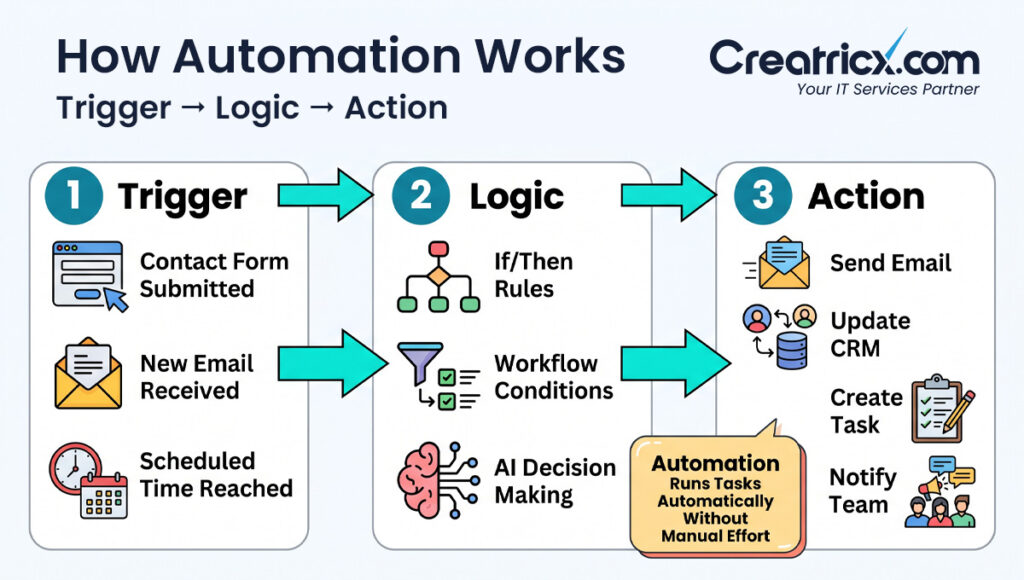
Most automation follows a simple pattern of three parts:
- Trigger – An event that starts the process, such as a new form submission or a scheduled time.
- Rules or logic – A set of instructions that decide what happens next, from simple “if this, then that” rules to AI-driven decisions.
- Action – The task the system carries out, such as sending a message, updating a record or moving data.
For example, when a customer fills in a contact form (the trigger), an automation can check the details (the logic) and then add the customer to a database and send a welcome email (the actions) — all without anyone lifting a finger.
Types of Automation
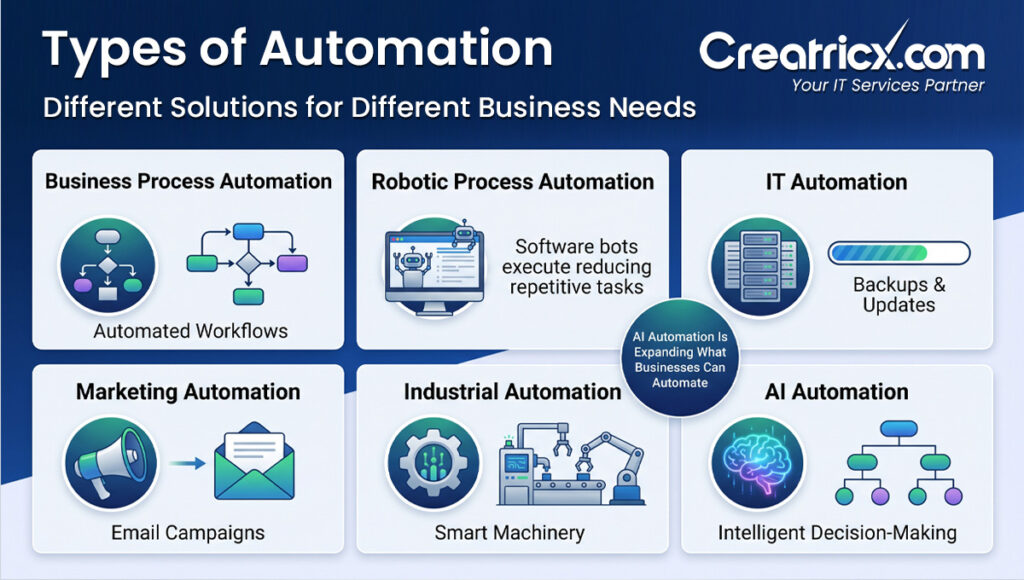
Automation comes in several forms, each suited to different tasks:
| Type of Automation | What It Does | Common Example |
| Business Process Automation | Automates entire workflows across a business | Automated invoice approval |
| Robotic Process Automation | Software bots handle repetitive digital tasks | Copying data between systems |
| IT Automation | Automates IT and infrastructure tasks | Scheduled backups and updates |
| Marketing Automation | Automates marketing tasks and campaigns | Triggered emails and follow-ups |
| Industrial Automation | Uses machinery to automate physical work | Robotic assembly lines |
| AI Automation | Uses AI for tasks that need judgement | Chatbots and smart document processing |
AI automation is the fastest-growing of these. By adding intelligence to automated workflows, it can handle tasks that once needed a human, such as understanding written requests or sorting unstructured information.
Automation Trends
A few well-established trends show why automation matters more each year:
- Adoption is rising across industries – Businesses of all sizes now use automation, not just large enterprises.
- AI is accelerating it – Intelligent tools are expanding what can be automated beyond simple, rule-based tasks.
- Routine work is the first target – The most automated tasks are repetitive ones such as data entry, scheduling and reporting.
- Productivity is the main driver – Companies adopt automation to save time, reduce errors and free staff for higher-value work.
Why Businesses Use Automation
Companies of every size turn to automation for clear, practical reasons:
- Cost reduction – Automating routine work lowers the cost of repetitive manual tasks.
- Speed – Automated processes run instantly and around the clock.
- Accuracy – Removing manual steps reduces human error and rework.
- Scalability – Automation handles growing volumes without extra staff.
- Focus on core work – Teams spend less time on admin and more on work that adds value.
- Consistency – Tasks are completed the same way every time, improving quality.
Real Examples of Automation in Business
Automation shows up across almost every department:
- Customer service – Chatbots answer common questions and route complex ones to staff.
- Sales and marketing – Automated emails nurture leads and follow up at the right time.
- Finance – Invoices, payments and expense approvals run through automated workflows.
- Human resources – Onboarding tasks, reminders and document collection happen automatically.
- Operations – Data moves between systems without manual copying and pasting.
- IT – Backups, monitoring and software updates run on a schedule without manual effort.
Common Automation Mistakes
Avoid the errors that trip up automation projects:
- Automating a broken process – Fix and simplify a process before automating it.
- Trying to automate everything at once – Start small and expand once you see results.
- Ignoring staff buy-in – Involve and train the people whose work will change.
- No clear goals or metrics – Without targets, you cannot measure success.
- Overlooking security – Automated workflows still need proper data protection.
How to Get Started With Automation
You do not need a huge budget or a technical team to begin. Follow these steps:
- Identify repetitive tasks – Look for work that is manual, frequent and rule-based.
- Map the process – Write down each step so you understand it fully before automating.
- Set clear goals – Decide what success looks like, such as saved time or fewer errors.
- Choose the right tools – Pick software that fits your needs and existing systems.
- Start with a pilot – Automate one small process first to test the approach.
- Test and measure – Check the results against your goals and fix any issues.
- Scale gradually – Roll out automation to more tasks once the pilot proves its value.
Benefits of Automation
- Lower operational costs across routine tasks.
- Faster completion of repetitive work.
- Fewer errors and less rework.
- Easy scaling as your business grows.
- More time for your team to focus on high-value work.
Automate the Right Way
Good automation supports people rather than replacing good judgement:
- Automate proven processes first – Start with tasks you already understand well.
- Keep humans in the loop – Leave decisions that need judgement to your team.
- Protect your data – Make sure automated workflows handle information securely.
- Review regularly – Maintain and update automations as your needs change.
Why Creatricx Is a Trusted Automation Partner
Setting up automation that actually saves time takes the right tools, a clear plan and careful implementation. At Creatricx, we help businesses grow without the cost of building large in-house teams, and our remote experts become an extension of your team.
Our approach to automation includes:
- Process review to find the tasks worth automating first.
- Tailored automation built around your systems and goals.
- AI-powered workflows that handle more than simple rule-based tasks.
- Secure implementation that protects your data at every step.
- Ongoing support so your automations keep running smoothly as you grow.
To start saving time, explore our AI & automation services, our cloud services for scalable infrastructure, or our digital solutions services for marketing automation.
Ready to automate the routine work? Get a Quote for your project, contact the Creatricx team, or book a free consultation to talk through your goals. You can also reach us any time through our contact page.
Frequently Asked Questions
What is automation in simple terms?
Automation is using technology to do tasks for you with little or no manual effort. A system follows set rules or intelligent logic to complete work automatically and consistently.
What is the difference between automation and AI?
Automation follows set rules to complete tasks, while AI adds the ability to learn and make decisions. AI automation combines the two, allowing automated workflows to handle tasks that need judgement.
What types of tasks can be automated?
Repetitive, rule-based tasks are the easiest to automate — things like data entry, scheduling, email follow-ups, invoicing, reporting and backups. With AI, more complex tasks can be automated too.
What are the benefits of automation?
The main benefits are lower costs, faster work, fewer errors, easier scaling and more time for your team to focus on high-value tasks that need a human touch.
Is automation only for large businesses?
No. Small and mid-sized businesses benefit just as much, often more. Affordable tools mean any business can automate routine tasks and free up valuable time.
Will automation replace jobs?
Automation usually replaces repetitive tasks rather than whole roles. It frees people from routine work so they can focus on tasks that need creativity, judgement and human interaction.
How do I start automating my business?
Begin by identifying a simple, repetitive task, map out its steps, set a clear goal, and automate it as a small pilot. Once it works, expand automation to other areas gradually.
Is automation secure?
Automation can be very secure when set up correctly. The key is to protect the data moving through automated workflows and to review and maintain your automations over time.